
Appearance
Membership and billing
Membership is the money and sessions side of your account: what you are on, how much of it is left, and what you have paid.
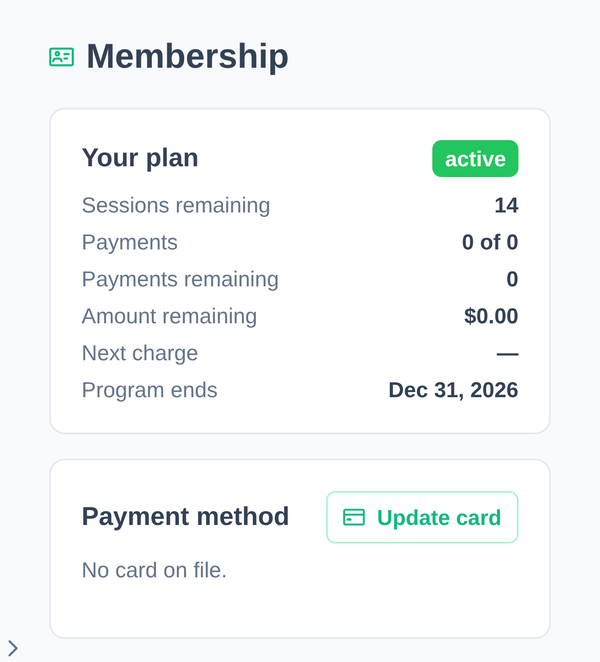
Your plan
The top of the page shows:
| Sessions remaining | How many you have left to book |
| Payments remaining | How many charges are still to come |
| Amount remaining | What is left to pay over the plan |
| Next charge | When the next payment is due |
| Program ends | When the plan runs out |
All sessions used means exactly that, so talk to your gym about renewing. You're on track means your sessions and your payments are keeping pace with each other.
Below that, Upcoming sessions lists what you have booked, each with a Request cancel option. Cancelling is covered in Bookings and Open Gym, where the notice you give decides whether the session comes back to you.
Payment method
Payment method shows the card on file, and Update card replaces it. If it says "No card on file", your gym is collecting payment some other way, or has not set one up yet.
Payment history lists what has been charged and when.
We do not have your card number. It is held by the payment processor, and the app only ever shows the last few digits.
Pausing your membership
Request a pause asks your gym to put your plan on hold. You give a start date, an estimated return date, and optionally a reason.
Billing stops for the paused period.
It is a request rather than a switch: your gym reviews it and confirms. How long and how often you may pause are their decisions.
Cancelling your membership
Request to cancel does the same thing for ending the plan: it notifies your gym, and they confirm the details with you.
The terms the app shows you before you submit:
- Two weeks' notice applies.
- A penalty of up to 20% on remaining payments may apply.
- During a free trial, neither applies. Cancelling in the trial takes effect straight away and there is nothing to pay.
Anything beyond that, including whether the penalty is actually charged in your case, is between you and your gym.
Billing questions we cannot answer
Charges, refunds, plan changes, session counts and contract terms are all set by your gym. We build the software. We do not run your gym's billing, and support cannot alter what you owe or what you have been charged.
Talk to your gym first. If the app is showing something that is plainly wrong, such as a payment you made that is not listed, or a session count that does not move, then it is ours and we want to hear about it: contact support.